93 servers.
84 had drifted.
Nobody had run a full audit on that fleet in over two years.
Server Sanity reads a cPanel server end to end, compares it against the baseline you define, and puts every drift in one HTML report. Then it moves the drift back — one scope at a time, with a diff first and a backup of every file it touches. And it can put it all back.
# reads everything, writes nothing
./server_audit.sh                       safe

# shows every change it would make, then exits
./server_resetter.sh --only ssh,csf     safe

# the only kind of line that changes your server
./server_resetter.sh --only ssh --apply writes
$299 · one-time · unlimited servers · instant download
--apply
cPanel/WHM on CloudLinux or AlmaLinux · bash 4.2+
One server. One HTML file. Twenty-six sections.
No server-side rendering, no external assets, no CDN. Open it in a browser, email it to a client, or keep it as evidence of what that box looked like on that date.
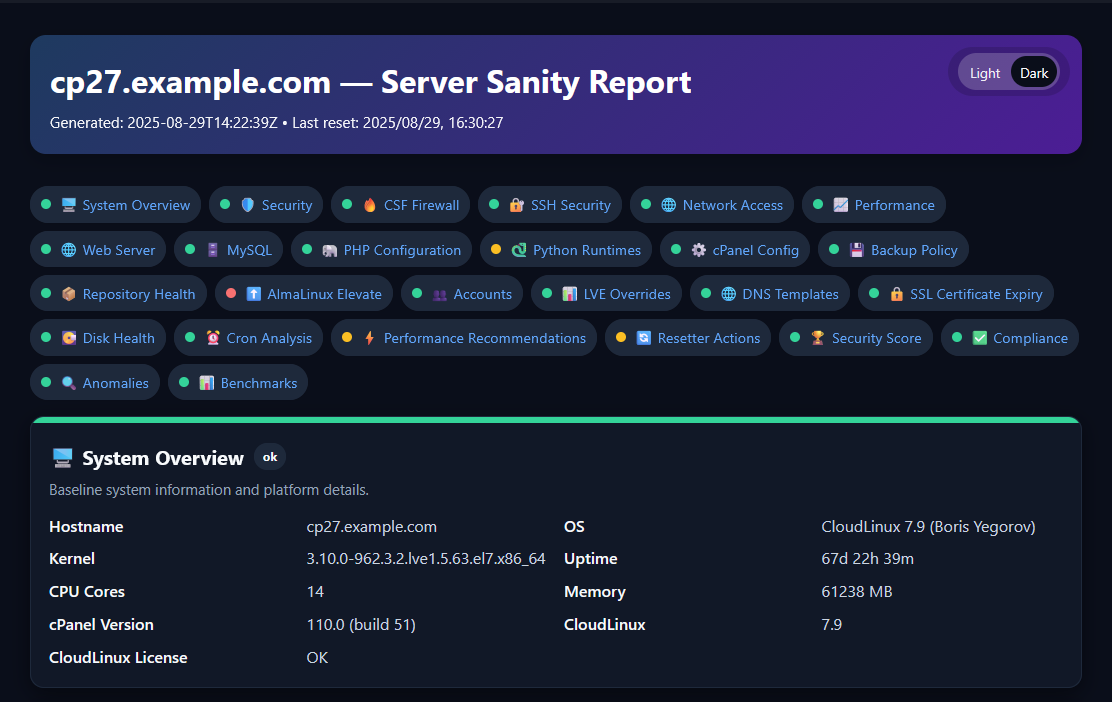
ok /
warn /
err badge with a plain-English
explanation of what was found and why it matters.
Press d anywhere in the report to switch between dark and light, and it remembers. Every timestamp is shown in UTC and labelled as such, so reports from servers in different timezones can be read side by side — hover one to see it in your own local time.
Find it, fix it, undo it, see the whole fleet
Most tools sell you one of these four boxes. Config-management suites do all four and ask you to become a config-management engineer first. This is for the person with forty servers and no platform team.
Audit
server_audit.sh
Reads the whole server and emits JSON plus a standalone HTML report. Writes nothing. Safe on production at midday, safe in cron.
Reset
server_resetter.sh
Moves configuration back toward your baseline across eleven scopes — once
you have read the diff and typed
--apply.
Restore
restore.sh
Every restore point, newest first. Roll back a whole run or a single file — and the copy it overwrites is itself backed up first.
Fleet view
generate_index.sh
Reports upload over FTPS to a reporting host, where a cron job builds a searchable dashboard and a rolling 90-day archive.
Does it scale past one box?
This is the dashboard the loop produces, on the fleet it was built for.
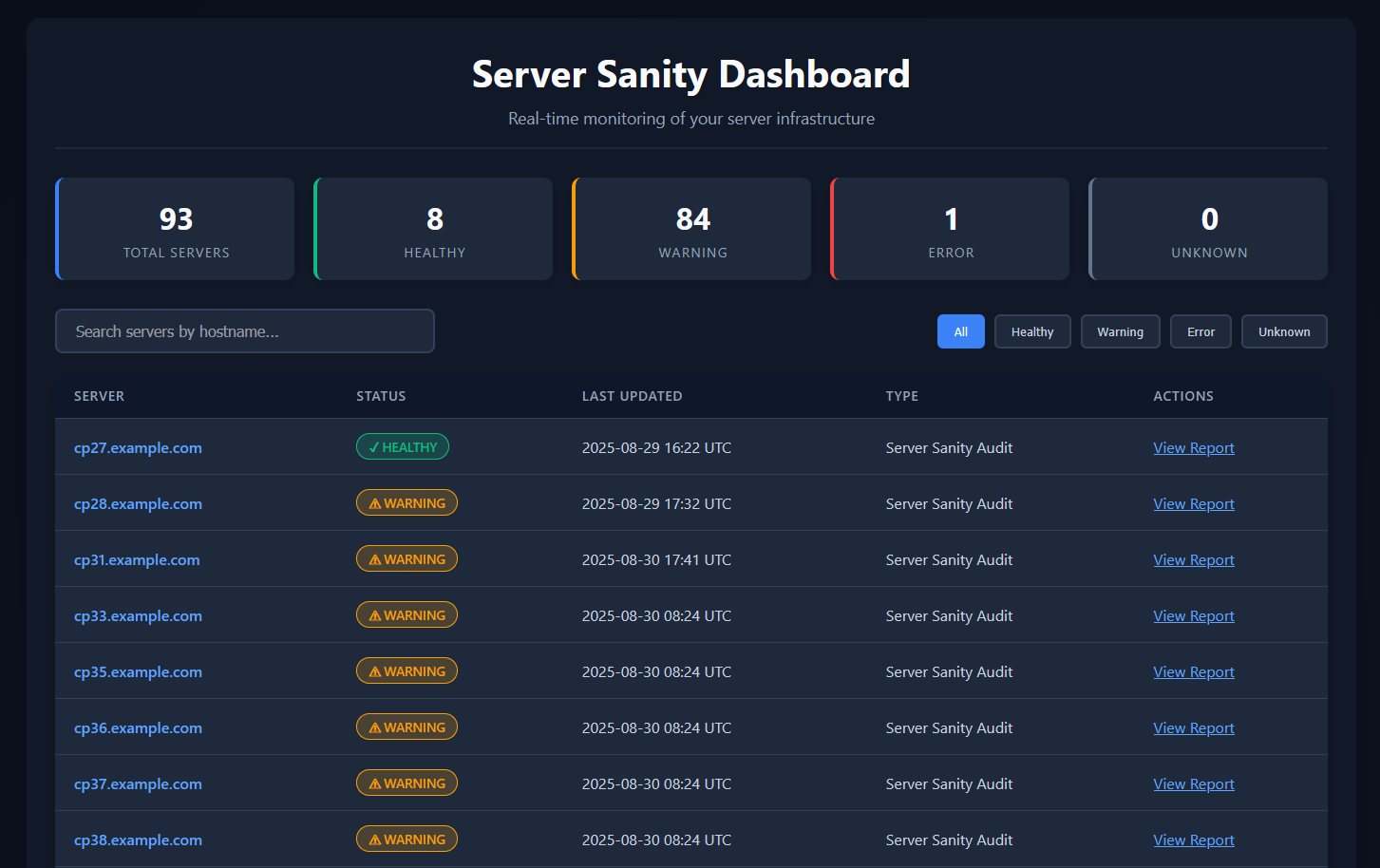
Eighty-four warnings out of ninety-three is not a broken tool. It is two years of accumulated drift on a fleet where support staff make undocumented WHM changes during incidents and nobody goes back afterwards. The previous audit of that estate was done by hand, and it took six months.
Search by hostname, filter by status, click through to any server's full report. Reports older than 30 days move into a monthly archive on their own, and the archive prunes itself at 90 days — so the dashboard stays the current picture instead of becoming a landfill.
There is no --dry-run to forget
I have watched junior engineers skip --dry-run
on production servers more than once. Not out of carelessness — at 2am,
under pressure, with a manager on the phone, you type the command you remember
and the flag is the part you don't.
So preview isn't a flag here. It is simply what the tool does.
Changing your server is the thing you have to ask
for — and asking means typing
--apply, then confirming
at a prompt.
Forget a flag and nothing happens to your server. That is the whole design, and it is why I was willing to run this as root across ninety-three production boxes.
A real diff, first
Every file change is printed as a unified diff before anything is written. Not a summary of intent — the actual lines.
Start small
--only ssh,csf touches SSH and CSF and
nothing else. --list-scopes tells you
what the eleven scopes are.
Timestamped backups
Every file the resetter touches is copied to the backup directory under that run's timestamp, before it is changed.
Undo the undo
Before a restore overwrites the current copy, that copy is backed up too. So a restore you regret can itself be rolled back.
The audit script is the exception that proves it: it has no
--apply at all, because it never writes to
server configuration under any flag.
What the audit reports on
Twenty-six sections. Each one exists because something broke once.
The ELevate card hides itself on servers already running CloudLinux 8, where it has nothing left to say — so those reports show 25.
The check nobody writes unless they've been burned
A server that reports CloudLinux 8 while
still running an .el7 kernel is a
half-completed ELevate. It boots. It serves sites. It passes every
“what OS is this?” check you would think to run. And it will
surprise you badly, months later, when something needs a kernel module.
Server Sanity looks for exactly that mismatch, along with a stalled ELevate
stage file and FAILED lines in the
ELevate log. Nobody writes that check from a feature brainstorm. You write it
the week after it costs you a Saturday.
Eleven scopes you can reset
Run them all, or name the ones you trust today and come back for the rest.
ssh
sshd_config, root
authorized_keys,
hosts.allow and
csf.allow.
csf
csf.conf settings, plus the
TCP_IN /
TCP_OUT port lists.
cpanel
WHM tweak settings in /var/cpanel/cpanel.config
— the ones changed during an incident and never changed back.
lve
Per-account CloudLinux LVE limits, including the one-off override somebody set for a customer two years ago.
mail
Per-account mail limits and quotas.
php
The system default PHP version and every php.ini
— memory limit, upload size, execution time.
web
Apache MPM and LiteSpeed configuration. The MPM switch runs as a single
yum/dnf
shell transaction, so you never end up with two MPMs installed or none at all.
exim
exim.conf.localopts — SPF, secure
auth and cipher policy.
mysql
Read-only, always. It analyses and
recommends; it will not tune your database server even with
--apply. That is a different job, and it
belongs to a different tool.
maintenance
Writes the maintenance to-do report — the work the resetter deliberately will not do for you.
report
Updates the audit JSON, rebuilds the HTML, and uploads it to your reporting host. FTPS by default; plaintext FTP is refused unless you explicitly turn it on.
The baseline is yours, and it lives in one file
There is no “correct” configuration shipped with this toolkit, because there isn't one. A shared-hosting box and a single-tenant application server disagree about almost everything.
What you put in server-sanity.conf
is the baseline. The audit measures drift
from it and the resetter moves the server back toward it. Nothing is hardcoded:
paths, upload details, SSH policy, the CSF port list, version minimums per OS,
PHP limits, mail policy, dashboard branding and the analytics thresholds all come
out of that one file.
Get it right once, put it in version control, and every server in the fleet is measured against the same ruler.
BASELINE_SSH_PORT="22"
BASELINE_PERMIT_ROOT_LOGIN="without-password"
BASELINE_PASSWORD_AUTH="no"
BASELINE_CSF_PORTS=(22 80 443 2083 2087 2096 465 587 993 995)
BASELINE_ALLOWED_IPS=(203.0.113.10)      # your office. GET THIS RIGHT.
BASELINE_PHP_MIN_DEFAULT="8.3"
BASELINE_MARIADB_MIN="10.6"
The config is read from $SERVER_SANITY_CONF,
then the script directory, then /etc/server-sanity.conf
— so one file can drive a whole fleet, or a single box can override it. Every
setting is optional; anything you leave commented out keeps the built-in default.
Why not Ansible?
You probably should use Ansible — if you already have it, and a role library, and someone to maintain them. Plenty of small hosts have none of those, and forty servers anyway.
| Server Sanity | Ansible / Puppet | By hand over SSH | |
|---|---|---|---|
| To get started | Copy 5 scripts, edit one config file | Control node, inventory, roles, a skillset | Nothing — and that is the problem |
| Knows cPanel | Natively — WHM tweaks, LVE, ELevate, Exim, EA4 | Only what you write yourself | Only what you remember |
| Output | A shareable HTML report per server | Run logs | Notes, if you kept any |
| Fleet view | Built in, searchable, 90-day archive | A separate product (AWX / Tower) | No |
| Default behaviour | Preview. --apply to change |
Enforce, unless you pass --check |
Whatever you just typed |
| Rollback | Per run or per file, from timestamped backups | Re-run an older revision | Hope |
| Auditing 93 servers | A cron entry | Minutes, once the roles exist | Six months. I have the scars. |
This is not config management and does not pretend to be. It is the tool you reach for when you have inherited a fleet, you don't know what state it is in, and you need to find out before Monday.
The four things you're wondering
“Can it lock me out of my own server?”
The ssh and
csf scopes can, if you put the wrong values
in BASELINE_ALLOWED_IPS or
BASELINE_SSH_PORT. That warning is in the
README in plain sight rather than buried, because it is the real risk.
Which is exactly why the dry run prints the diff and exits, why
--apply prompts before it writes, and why
restore.sh exists. Read the diff. Then read it
again.
“I've got 40 servers.”
One licence, unlimited servers within your organisation, forever. No seat counting, no activation server, no phone-home, no licence key to manage. Put it on all 40 tonight if you want to — there is nothing to check in, and nothing that can lock you out of your own audit tooling during an incident.
“What does it need installed?”
Bash 4.2+, root, and openssl for
certificate inspection — all of which a cPanel box already has. No agent,
no daemon. jq is recommended but genuinely
optional: every collector has a shell fallback and produces the same numbers
without it, which matters on the older CloudLinux 7 boxes that need this most.
“Where does my data go?”
Onto your own disk, and nowhere else. The report is a file in
$REPORT_DIR on the server that produced
it. If you want the fleet dashboard, you
configure an FTPS upload to a host you
control. Nothing is sent to Steadfast, ever — there is no endpoint for it
to be sent to.
It finds it. The rest of the shelf fixes it.
Server Sanity deliberately stops short of tuning your database or rewriting your zones. Those are separate jobs with separate tools.
MySQL Auto-Tuner
The MySQL card tells you the server needs tuning. This does the tuning, and it costs nothing.
TOOLKITMySQL Toolkit
For when the MySQL card is red rather than amber — corruption, missing
tablespaces, a lost mysql.user table.
DNS Toolkit
Audits and repairs the zones behind the DNS Templates card, across a whole cluster.
Free companion tools for the Disk Health and Repository Health cards are in the pipeline. They are not part of this purchase.
One price. Every server. Forever.
One-time. No subscription, no renewals, all v1.x updates included.
Steadfast Server Sanity Toolkit
All five scripts, full source.
- Unlimited servers within your organisation
- Perpetual licence — yours forever
- All v1.x updates included
- Source-available — read and modify every line
- No licence key, no activation, no phone-home
- Annotated config example and a full README
Source-available under a perpetual licence — read every line and modify it for your own use, but not for redistribution or resale. Full licensing terms.
Where this came from
Twenty-five years in hosting, the last few of them on a fleet of ninety-three cPanel servers. Every check in this toolkit exists because something broke and I had to go and find it by hand first.
The ELevate kernel mismatch. The LVE override somebody set for one customer and forgot. The port opened at 2am during an incident and still open eighteen months later. The PHP version a migration left behind. These are not features from a brainstorm — they are scar tissue, and that is the one thing a competitor cannot copy off this page.
“Steadfast Tools exists for small hosts, one-man hosting companies, and sysadmins — whether you're just starting out or you're 40+ and running on fumes. These are the tools I wish I'd had.”
— Rudi Burger, 25 years of hosting infrastructure, Steadfast Codeworks
Steadfast Server Sanity Toolkit
One-time. Unlimited servers. Instant download. No renewals.